
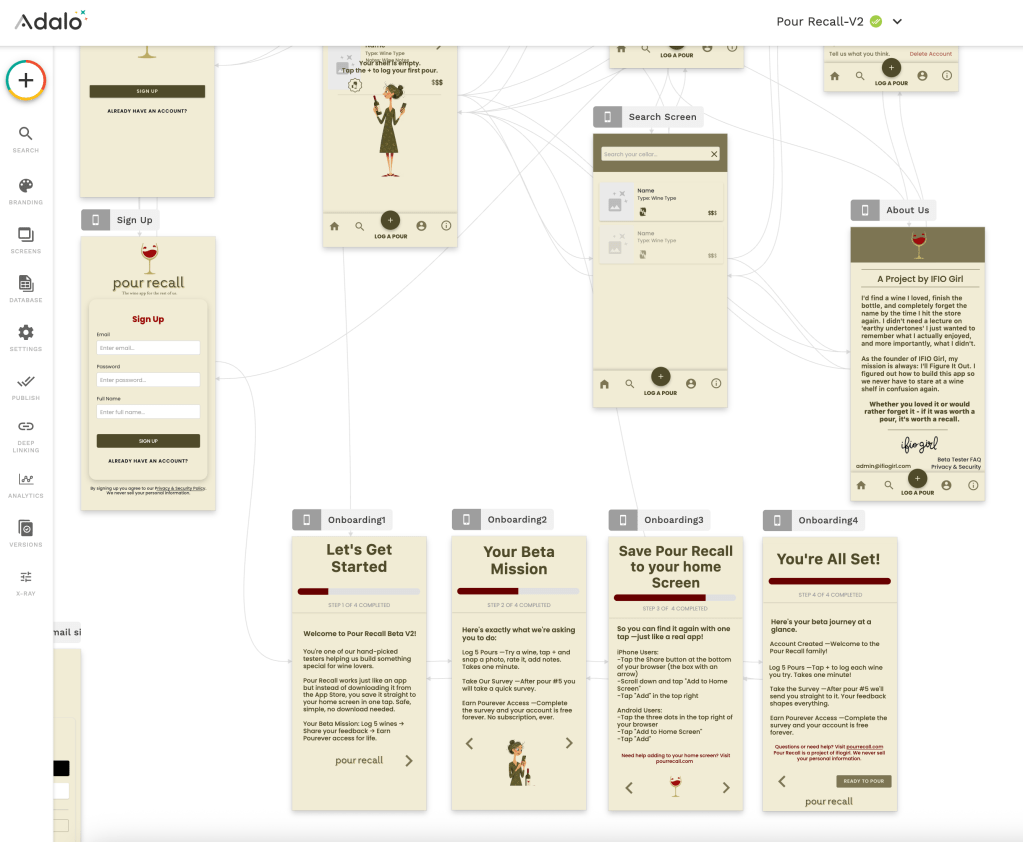
My undiagnosed ADD was running the show today. I sat down to work on one thing and three hours later I was somewhere completely different having figured out something I didn’t even know I needed to figure out. That’s exactly what happened when I was building the onboarding screens for Pour Recall.
Messy Middle
I was deep in aligning and tweaking the onboarding screens. You know, those first few screens you see when you open an app for the first time that explain what it is and how to get started. I was working on making them simple, warm, and hopefully helpful especially for people who aren’t super tech savvy.
And then my mind jumped – I probably should explain a web app…
Pour Recall isn’t in the App Store. It’s a web app which means instead of downloading it, you save it to your phone’s home screen. Same experience, no download needed. But try explaining that to someone who has never heard of a web app before.
I kept rewriting the onboarding screen trying to make it feel less confusing and more reassuring. And somewhere in the messy middle of all that rewriting I hit me:
This explanation doesn’t just belong inside the app. It belongs on my website too.
Then I Looked at My Website
So I went to ifiogirl.com and took a long honest look at the Pour Recall section.
And it really needed work.
It wasn’t doing enough. Someone landing on my website curious about Pour Recall deserved answers to the questions I knew they were going to have because honestly? They’re the same questions I would have if someone asked me to log into an app I’d never heard of.
- What exactly is this app?
- Is it safe?
- Why isn’t it in the App Store?
- How do I get it on my phone?
- What do you do with my information?
None of the answers to any of these questions were on my website. So I got to work.
I wrote a Privacy and Security page, A Beta Tester FAQ, updated my landing page and started to work on a page on how to add Pour Recall to your phones home screen.
And that’s when ADD kicked in yet again.
The Lightbulb Moment
True story, I am 60 years old and I only recently learned you could save a website to your phone’s home screen. Nobody teaches you this. You either stumble across it or you don’t. And most people don’t.
Then it hit me while I was building this very instruction page for my beta version web app Pour Recall. This is no longer just about Pour Recall but more about letting people know how to install websites on their phones home screen.
How many people have a website they visit every single day a recipe site, a news page, a tool they use for work and they type the address into their browser every single time because they don’t know they can just save it to their home screen like an app?
This isn’t just a problem I was trying to solve for Pour Recall Beta testers. This is a nobody-ever-taught-us-this problem.
So Here’s the Thing Nobody Told You
You can save any website to your phone’s home screen. It works just like an app you’d download from the store tap the icon and you’re in. No browser. No typing. No hunting around.
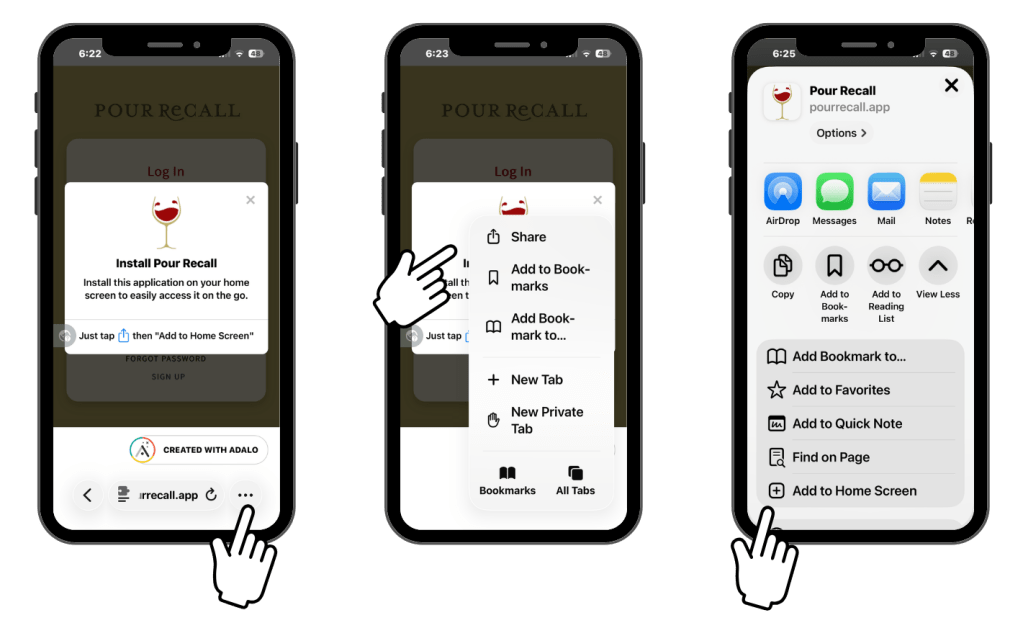
Here’s how: Iphone Users -I have an iphone so you get images.
iPhone Users
Step 1 — Open the website you want to save in Safari
Step 2 — Tap the three dots (…) in the bottom right corner of your browser
Step 3 — Tap Share from the menu that appears
Step 4 — Scroll down and tap “Add to Home Screen”
Step 5 — Tap “Add” to confirm
Android Users
If a banner appears at the bottom of your screen — tap “Install” or “Add to Home Screen” right then and there. Chrome on Android often does the work for you.
If you don’t see a banner:
Step 1 — Open Chrome and go to the website you want to save
Step 2 — Tap the three dots (…) in the top right corner of your screen
Step 3 — Tap “Add to Home Screen” or “Install App”
Step 4 — Tap “Add” to confirm
Done. The site now lives on your home screen like any other app.
Sites Worth Saving Right Now
Once you know how to do this you’ll start seeing possibilities everywhere:
- That recipe site you visit every week
- A news source you check every morning
- Your favorite online shop
- Any tool that helps you stay organized
Not every useful site lives in the App Store. If you’re visiting it regularly it deserves a spot on your home screen just as much as any app you downloaded.
And Of Course Pour Recall
I’d love it if the first site you saved was Pour Recall.
Currently, pourrecall.app is a web app that works just like all your other downloaded app once you save it to your home screen. We’re currently in testing with Beta V2, which will help us build it into something really special before our official App Store launch. So if you’re reading this today you’re actually getting an early look at something still being built.
Pretty cool if you ask me.
Plus Pour Recall is the whole reason this teaching moment post exists. While working on Pour Recall’s onboarding screens turned out to make my website better and making my website better gave me something valuable to teach and here I am writing this blog.
Share This With Someone Who Needs It
Text this to the person in your life who’s always typing URLs into their browser. Show your mom. Tell your sister. Share it with the group chat.
The best things I’ve figured out I didn’t figure out alone. And that’s always been the point.
I’ll Figure It Out together.

 IFIOGirl